|
|
 Posted - April 11 2010 : 6:22:40 PM Posted - April 11 2010 : 6:22:40 PM


|
Hi All.
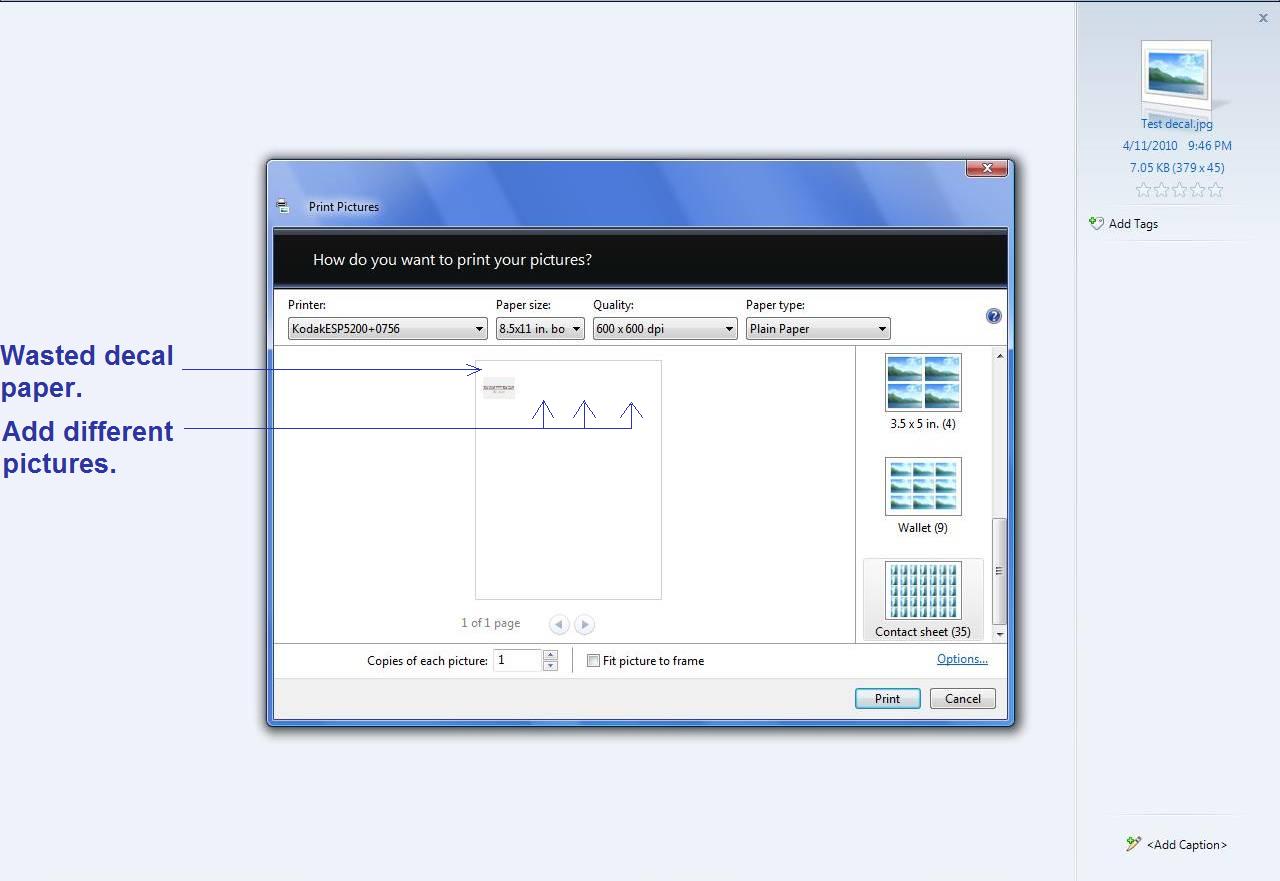
I have a few questions about printing decals. As we all know, decal paper is not cheap. The program I use to print my decals apears to be the widows default print program. As you can see by the picture, it wastes a lot of decal paper the way it prints them. I am not bashing the windows program but rather asking if I am doing it wrong. Maybe I am not sizing the decal before I print it and am just using the wrong size picture option. I want to be able to print the decal all the way at the top of the page so I don't waste paper. I would also like to print different decals together along the top so I will use the whole top edge. Maybe someone here does a lot of there own decals and can help me out with this or maybe has some links to in depth instructions on printing decals. I have so many questions. Please see pic. of what I am using.
Thanks in advance.
Mike
|
Country:  USA ~
Posts: 790 ~
Member Since: April 30 2006 ~
Last Visit: July 21 2015 USA ~
Posts: 790 ~
Member Since: April 30 2006 ~
Last Visit: July 21 2015
|
 Alert Moderator
|
|
|
|
 Posted - April 11 2010 : 7:36:45 PM Posted - April 11 2010 : 7:36:45 PM
|
| If you click on options does it give an option to adjust the margins? You may want to try laying it out in Word which will allow you to adjust the margins. Remember that you must be aware not to exceed margins smaller than what your printer can handle. Most printers will NOT print right up to the edge. Most modern printers will probably let you get down close to a quarter inch.
|
|
Country: USA ~
Posts: 1330 ~
Member Since: October 30 2005 ~
Last Visit: March 18 2026
|
Alert Moderator

|
|
|
|
 Posted - April 12 2010 : 06:23:58 AM Posted - April 12 2010 : 06:23:58 AM
|
Hi NYC,
Thanks very much for the help. It does give me an option for boarderless but it never works. I used Open Office to lay it out and was able to get the boarder down to .20 and that alone has saved me MUCH paper. I was also able to add other pictures to print for decals.
Thanks VERY much and let the fun begin!
Mike
|
|
Country: USA ~
Posts: 790 ~
Member Since: April 30 2006 ~
Last Visit: July 21 2015
|
Alert Moderator
|
|
 Home
Home Forums
 Events Calendar
 Forum Admins & Mods
 Register