|
|
 Posted - March 29 2009 : 09:44:48 AM Posted - March 29 2009 : 09:44:48 AM


|
Where and how do you get the animated gifs of trains to add to your posts? I have drawn locos on MS Paint, are these gifs similar?
Alco Fan
|
Country:  USA ~
Posts: 2496 ~
Member Since: August 03 2006 ~
Last Visit: September 17 2024 USA ~
Posts: 2496 ~
Member Since: August 03 2006 ~
Last Visit: September 17 2024
|
 Alert Moderator
|
|
|
|
Posted - March 29 2009 : 11:45:08 AM
|
I get mine as I travel the Web, shamelessly glombed as I see them...


|
|
|
|
|
Posted - March 29 2009 : 3:27:10 PM
|
Can you PM me a source, please. I have tried to copy them but the don't move after being copied.
Thanks,
Alco Fan
Alco Fan
|
|
Country: USA ~
Posts: 2496 ~
Member Since: August 03 2006 ~
Last Visit: September 17 2024
|
Alert Moderator

|
|
|
|
 Posted - March 29 2009 : 3:31:04 PM Posted - March 29 2009 : 3:31:04 PM
|
You have to put it as a PICTURE, not a URL... 
D.J. (Yeah, I'm "that kid"... Deal.)
http://railroadrandomness.blogspot.com/
Look; a new blog...
Yippee!
|
|
Country: USA ~
Posts: 157 ~
Member Since: February 05 2009 ~
Last Visit: June 05 2017
|
Alert Moderator
|
|
|
|
Posted - March 30 2009 : 5:19:41 PM
|
How do you save it right click on the image, then what do I do? I've played with it but no progress.
Alco Fan
|
|
Country: USA ~
Posts: 2496 ~
Member Since: August 03 2006 ~
Last Visit: September 17 2024
|
Alert Moderator
|
|
|
|
Posted - March 30 2009 : 6:38:13 PM
|
I just right click on it, a menu comes up that says "Save image as" then I direct it to my desired folder.
|
|
|
|
|
Posted - March 30 2009 : 6:54:03 PM

|
I usually right click on the picture, select Properties, copy the image URL, then paste the code in between (img) brackets.
That works fine, as long as the URL remains valid...

    
- Matt -
Edited by - MM 1498 on March 30 2009 6:54:49 PM
|
Country:  Canada ~
Posts: 1021 ~
Member Since: August 24 2008 ~
Last Visit: January 05 2020 Canada ~
Posts: 1021 ~
Member Since: August 24 2008 ~
Last Visit: January 05 2020
|
Alert Moderator
|
|
|
|
Posted - March 30 2009 : 8:26:42 PM
|
Here goes!

It woiked!! Thanks for the assists.
Alco Fan
Edited by - Alco Fan on March 30 2009 8:31:30 PM
|
|
Country: USA ~
Posts: 2496 ~
Member Since: August 03 2006 ~
Last Visit: September 17 2024
|
Alert Moderator
|
|
|
|
Posted - March 31 2009 : 10:45:07 AM
|

yay it worked! this probably how my REAL crossing sign will look in my yard this probably how my REAL crossing sign will look in my yard
|
|
Country: USA ~
Posts: 15047 ~
Member Since: February 23 2009 ~
Last Visit: October 15 2026
|
Alert Moderator
|
|
|
|
Posted - March 31 2009 : 8:32:52 PM
|
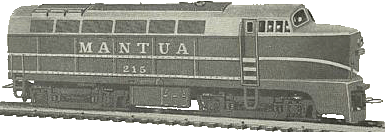
This was a bitmap that i changed to a gif. The detail is not here as in others I've seen but I'd like to animate it in a scene. I need to study a tutorial.

Alco Fan
|
|
Country: USA ~
Posts: 2496 ~
Member Since: August 03 2006 ~
Last Visit: September 17 2024
|
Alert Moderator
|
|
|
|
Posted - March 31 2009 : 11:00:19 PM
|
quote:I usually right click on the picture, select Properties, copy the image URL, then paste the code in between (img) brackets.
That works fine, as long as the URL remains valid...
/tyco/forum/uploaded/MM 1498/Train_moves.gif
Originally posted by MM 1498-March 30 2009: 6:54:03 PM
|
---NABBED--- Yep, stole another'n...
|
|
|
|
|
Posted - April 01 2009 : 07:18:23 AM
|
quote:quote:I usually right click on the picture, select Properties, copy the image URL, then paste the code in between (img) brackets.
That works fine, as long as the URL remains valid...
/tyco/forum/uploaded/MM 1498/Train_moves.gif
Originally posted by MM 1498-March 30 2009: 6:54:03 PM
|
---NABBED--- Yep, stole another'n...
Originally posted by shaygetz-March 31 2009: 11:00:19 PM
|

- Matt -
|
|
Country: Canada ~
Posts: 1021 ~
Member Since: August 24 2008 ~
Last Visit: January 05 2020
|
Alert Moderator
|
|
 Home
Home Forums
 Events Calendar
 Forum Admins & Mods
 Register