|
|
 Posted - June 01 2008 : 6:46:34 PM Posted - June 01 2008 : 6:46:34 PM


|
Many of you remember I posted a poll many many weeks ago to obtain your viewing resolution and issues. I worked on the formatting and implemented what is now a variable image resizing feature. Here's how it works.
The forum will detect your current browsers viewing width, not your screen resolution. I then shave off a bunch of pixels to allow for the column nature of many of the pages here. What's left is the amount the forum will reduce your image to if it is over 640px (maybe 600, I've been playing with this number) wide to begin with.
I view the forums at 1280 x 1024 and they've always looked fine but then I switched down to 1024 x 768 which was the most common resolution for those that participated in the polls. I didn't like it at all and I think the auto resizing has worked wonders for that.
How is working for everyone else? I use IE and I know most of you do also. If it behaves differently for other browsers I need to hear from you.
|
Country:  USA ~
Posts: 1330 ~
Member Since: October 30 2005 ~
Last Visit: March 18 2026 USA ~
Posts: 1330 ~
Member Since: October 30 2005 ~
Last Visit: March 18 2026
|
 Alert Moderator
|
|
|
|
Posted - June 01 2008 : 7:57:56 PM

|
Hi Todd:
See my last layout posting... I'm pretty happy with things....
-Gareth
|
Country:  Canada ~
Posts: 4200 ~
Member Since: January 08 2006 ~
Last Visit: November 09 2021 Canada ~
Posts: 4200 ~
Member Since: January 08 2006 ~
Last Visit: November 09 2021
|
Alert Moderator

|
|
|
|
Posted - June 01 2008 : 9:56:14 PM
|
| I like it.[;)]
|
|
|
|
|
Posted - June 01 2008 : 10:09:38 PM
|
I am very happy with the resizing feature !!!
Thank You
Bob
|
|
Country: USA ~
Posts: 385 ~
Member Since: August 08 2007 ~
Last Visit: January 24 2026
|
Alert Moderator
|
|
|
|
 Posted - June 01 2008 : 10:16:39 PM Posted - June 01 2008 : 10:16:39 PM
|
None of the pictures ever displays at more than 570px wide for me... and my browser is usually well beyond 1200px wide (my screen is 1600x1200). The goofy thing is, the left column for usernames and avatars is wider than the content column. Makes no difference if I use IE or Firefox. Or another PC for that matter.
Also, the "click to enlarge" feature has never worked. But, at least in Firefox, you can right-click and view an image in its uncompressed state. So I can deal with that.
I'm not really complaining... just pointing the bugs out if you were curious. I am very glad to no longer need to make two copies of every image I upload, just to have a smaller one to post here. [^]
|
|
Country: USA ~
Posts: 2175 ~
Member Since: July 15 2006 ~
Last Visit: January 31 2010
|
Alert Moderator
|
|
|
|
Posted - June 01 2008 : 10:20:00 PM
|
GIC:
You ever notice a script error failure during trying to add a large image file?
-Gareth
|
|
Country: Canada ~
Posts: 4200 ~
Member Since: January 08 2006 ~
Last Visit: November 09 2021
|
Alert Moderator
|
|
|
|
Posted - June 02 2008 : 08:43:18 AM
|
I am also seeing differences between IE (I use V6) and Firefox (its current code) for the pictures. The attached image was taken with a screen resolution of 1280x1024.
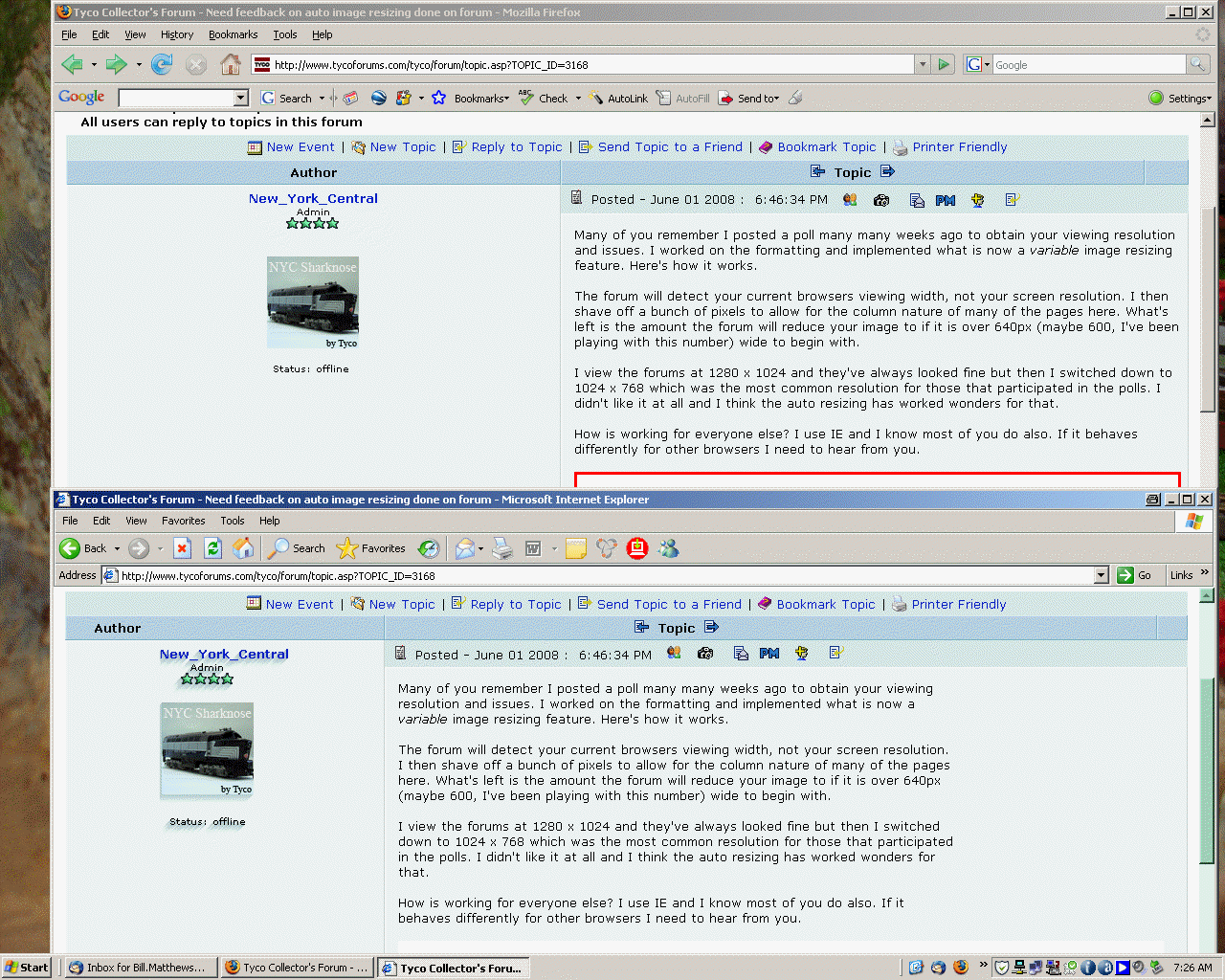
The browser in the foregrown is IE - and at this resolution, there is no red box and the dividing line is at the "e" in "New Topic".
The browser in the back is Firefox - and the dividing line is at the "c" in "Reply to Topic". Also, with Firefox, the image in shaygetz's signature line does not display.
No complaints - just information. While I do normally use Firefox, for this gathering I am happy to use IE - the pictures, whatever the size add so much to the discussions. They are indeed worth a 1000 words.
Cheers
Bill
|
|
Country: USA ~
Posts: 122 ~
Member Since: May 17 2008 ~
Last Visit: July 29 2019
|
Alert Moderator
|
|
|
|
Posted - June 02 2008 : 08:52:46 AM
|
I just love computers ... and browsers .. they make one to look so foolish at times. I had played around with screen resolutions - doing a browser refresh each time .. before doing this testing, I was getting a red box on the 1st picture and the click to enlarge did nothing. But, when I did the screen capture of the two browsers, there was no red box with IE. So, I did not mention this behaviour. After I posted my reply with the picture, the red box with IE came back - and the click to enlarge worked for the first time.
So, please take these two replys with a grain of salt .. that may or may not have any value.
Cheers
Bill
|
|
Country: USA ~
Posts: 122 ~
Member Since: May 17 2008 ~
Last Visit: July 29 2019
|
Alert Moderator
|
|
|
|
Posted - June 02 2008 : 08:56:05 AM

|
| no probs at all as far as i am concerned,it does its job and all photos are uniform ken
|
Country:  United Kingdom ~
Posts: 8294 ~
Member Since: September 28 2006 ~
Last Visit: October 20 2021 United Kingdom ~
Posts: 8294 ~
Member Since: September 28 2006 ~
Last Visit: October 20 2021
|
Alert Moderator
|
|
|
|
Posted - June 02 2008 : 1:23:26 PM
|
Thanks everyone.
One thing I notice is that the features only work well if your browser is maximized. If you've resized it down it does exhibit some funky behavior. Let's try that first and see where we can go from that.
I have options. I can dump the browser width and go with the resolution width, amongst other things.
Tony I'm getting a larger max reduced image (678px wide) than you are and I'm running at 1280 wide.
I'll be playing around with this some more this week, disregard any strange behaviour. It will probably go away within a few minutes.
|
|
Country: USA ~
Posts: 1330 ~
Member Since: October 30 2005 ~
Last Visit: March 18 2026
|
Alert Moderator
|
|
|
|
Posted - June 03 2008 : 10:25:40 PM
|
Okay, here's my environment:
I have a 17" Compaq monitor.
I have FireFox as my browser...
The arrangement I have in this forum is white letters on a dark blue background.
My screen is set to 1024 X 768 @ 32 bit, the highest detail setting.
I am impressed with the present settings I am able to have.
I have no problem seeing the pages, details, etc.
I do like the "Click to enlarge" option. I have no problems with that, as well as clicking it again to original viewing.
Again, no problems.
When the page loads up pictures, it resizes a few times.
I do like the settings, compared to the earlier ones... having to click on the horizontal slide tool to shift left and right to see the whole picture was annoying.
Well, so far, I am pleased with what has been done.
John
I don't have a one track mind. It depends on the turn-out.
"I love your catenary!"
Is that a power-trip or just another pick-up line?
|
|
Country: Canada ~
Posts: 1124 ~
Member Since: December 15 2006 ~
Last Visit: January 30 2023
|
Alert Moderator
|
|
|
|
Posted - June 04 2008 : 11:40:19 AM
|
Love it, works well currently...Garret
"Though amid all the smoking horror and diabolism of a sea-fight, SHARKS will be seen longingly gazing up to the ship's decks, like hungry dogs round a table where red meat is being carved, ready to bolt down every killed man that is tossed to them . . ." by Herman Melville
|
|
Country: USA ~
Posts: 209 ~
Member Since: March 25 2008 ~
Last Visit: August 03 2012
|
Alert Moderator
|
|
|
|
Posted - June 04 2008 : 12:49:38 PM
|
Sometimes I open the page to view and the picture is already larger, this was one of my pics that was posted. I have trouble enlarging the photos, sometimes refreshing the page helps.
If the photo is already resized does that affect the size that it first appears on the page before enlarging.
Thanks for your efforts.
PS: We use AOL and it's been running differently lately. Today it is much better and the first 2 problems are gone.
Alco Fan
Edited by - Alco Fan on June 04 2008 12:53:10 PM
|
|
Country: USA ~
Posts: 2496 ~
Member Since: August 03 2006 ~
Last Visit: September 17 2024
|
Alert Moderator
|
|
 Home
Home Forums
 Events Calendar
 Forum Admins & Mods
 Register