|
|
 Posted - April 03 2016 : 2:05:59 PM Posted - April 03 2016 : 2:05:59 PM


|
Can someone tell me how to post pictures? I have a lot of rolling stock, locos and buildings I'ld like to post pics of. I appreciate any help.
Yardmaster 54
|
Country:  USA ~
Posts: 277 ~
Member Since: October 01 2011 ~
Last Visit: August 27 2025 USA ~
Posts: 277 ~
Member Since: October 01 2011 ~
Last Visit: August 27 2025
|
 Alert Moderator
|
|
|
|
Posted - April 03 2016 : 4:50:34 PM
|
There's a tutorial on this Forum some where, but
bearing in mind I am not a computer whiz, the
main thing is to find the picture you want on
your computer, shrink it down to a certain size,
and then upload it to the Forum.
Using Windows 10, I first open the desired shot,
then click on "open with paint" and click on
"resize." That brings up the image and you
will see it is too big. So you click on the
function that has to do with "pixels." Reduce
the horizontal number of pixels down to a
1,000 (and the vertical will adjust automatically).
Click "save as" if you want to label said picture.
The you go back to the desired "thread" (topic
of discussion). First you click on "Reply to Topic"
and then a window opens up and you click on
the little camera icon on the upper right corner.
From there, you click on the "browse" button and
all your pictures will show up. Enter the name of
the picture you just labeled and select it by left
clicking on it. When, or if, the little blue file label
pops up, you click on the "post new reply" button
in the bottom of the window, after you type in
whatever you want to write.
Two buts: if you use things like - # , the picture might not
upload. Second, sometimes the image won't upload anyways
just because it is feeling ornery, and you have to re-attempt
a time or two.
Hope that is simple enough. I like simple. That is
why I like Tyco.
We are eager to see what you have to post. At least
I am, I never get tired of looking at this stuff.
Edited by - Chops124 on April 03 2016 6:45:17 PM
|
|
Country: USA ~
Posts: 11693 ~
Member Since: December 09 2013 ~
Last Visit: October 13 2026
|
Alert Moderator

|
|
|
|
Posted - April 04 2016 : 02:31:25 AM
|
quote:There's a tutorial on this Forum some where, but
bearing in mind I am not a computer whiz, the
main thing is to find the picture you want on
your computer, shrink it down to a certain size,
and then upload it to the Forum.
Using Windows 10, I first open the desired shot,
then click on "open with paint" and click on
"resize." That brings up the image and you
will see it is too big. So you click on the
function that has to do with "pixels." Reduce
the horizontal number of pixels down to a
1,000 (and the vertical will adjust automatically).
Click "save as" if you want to label said picture.
The you go back to the desired "thread" (topic
of discussion). First you click on "Reply to Topic"
and then a window opens up and you click on
the little camera icon on the upper right corner.
From there, you click on the "browse" button and
all your pictures will show up. Enter the name of
the picture you just labeled and select it by left
clicking on it. When, or if, the little blue file label
pops up, you click on the "post new reply" button
in the bottom of the window, after you type in
whatever you want to write.
Two buts: if you use things like - # , the picture might not
upload. Second, sometimes the image won't upload anyways
just because it is feeling ornery, and you have to re-attempt
a time or two.
Hope that is simple enough. I like simple. That is
why I like Tyco.
We are eager to see what you have to post. At least
I am, I never get tired of looking at this stuff.
Originally posted by Chops124 - April 03 2016 : 4:50:34 PM
|
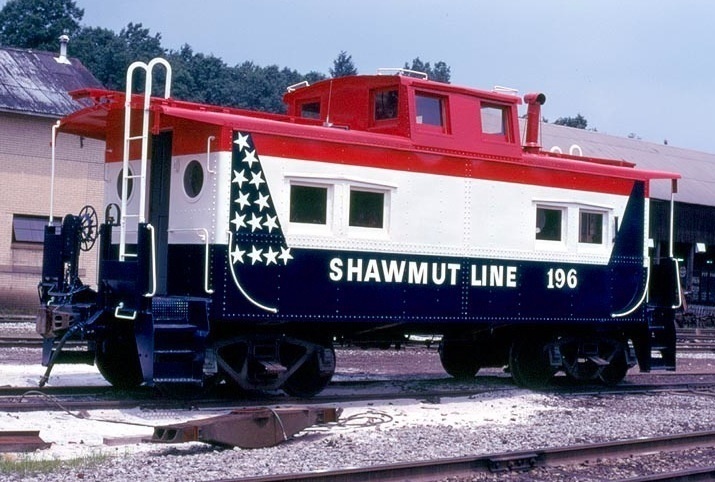
Hey it worked. I like you am not a computer whiz either. Now all I need to do is get some pics of my train stuff and show them off. (lol) I greatly appeciate your help Chops. I will send you a pm when I get to post them. Once again thank you.
Yardmaster 54
|
|
Country: USA ~
Posts: 277 ~
Member Since: October 01 2011 ~
Last Visit: August 27 2025
|
Alert Moderator
|
|
|
|
Posted - April 06 2016 : 10:03:07 PM
|
Hey, that's great. We eagerly await your stuffs. I must
say, that is a very realistic caboose. How did you do
those grab hands???
|
|
Country: USA ~
Posts: 11693 ~
Member Since: December 09 2013 ~
Last Visit: October 13 2026
|
Alert Moderator
|
|
|
|
Posted - April 07 2016 : 02:15:54 AM
|
quote:Hey, that's great. We eagerly await your stuffs. I must
say, that is a very realistic caboose. How did you do
those grab hands???
Originally posted by Chops124 - April 06 2016 : 10:03:07 PM
|
I wish I was that good. It's a real caboose, I just copied it off the internet to see if I could post it. Thanks for the Compliment. lol
Yardmaster 54
Edited by - yardmaster54 on April 08 2016 01:08:16 AM
|
|
Country: USA ~
Posts: 277 ~
Member Since: October 01 2011 ~
Last Visit: August 27 2025
|
Alert Moderator
|
|
|
|
Posted - April 07 2016 : 1:35:53 PM
|
I will be waiting with bated breath to see your
work. I always enjoy new perspectives.
|
|
Country: USA ~
Posts: 11693 ~
Member Since: December 09 2013 ~
Last Visit: October 13 2026
|
Alert Moderator
|
|
 Home
Home Forums
 Events Calendar
 Forum Admins & Mods
 Register